Register a Vehicle
Complete a vehicle registration by capturing the customer, sale, and serial information.
What you'll learn
- Entering customer and owner details
- Recording serial information and choosing warranties with their sell price
- Recording the sale and completing the registration
- Retrying a registration that did not go through
Before you start
- You need the Can register item serial permission; otherwise the register button is disabled.
- Open the vehicle from the Vehicles page and stay on the Details tab. The serial must be registrable (not marked Cannot be registered) and not already registered.
Steps
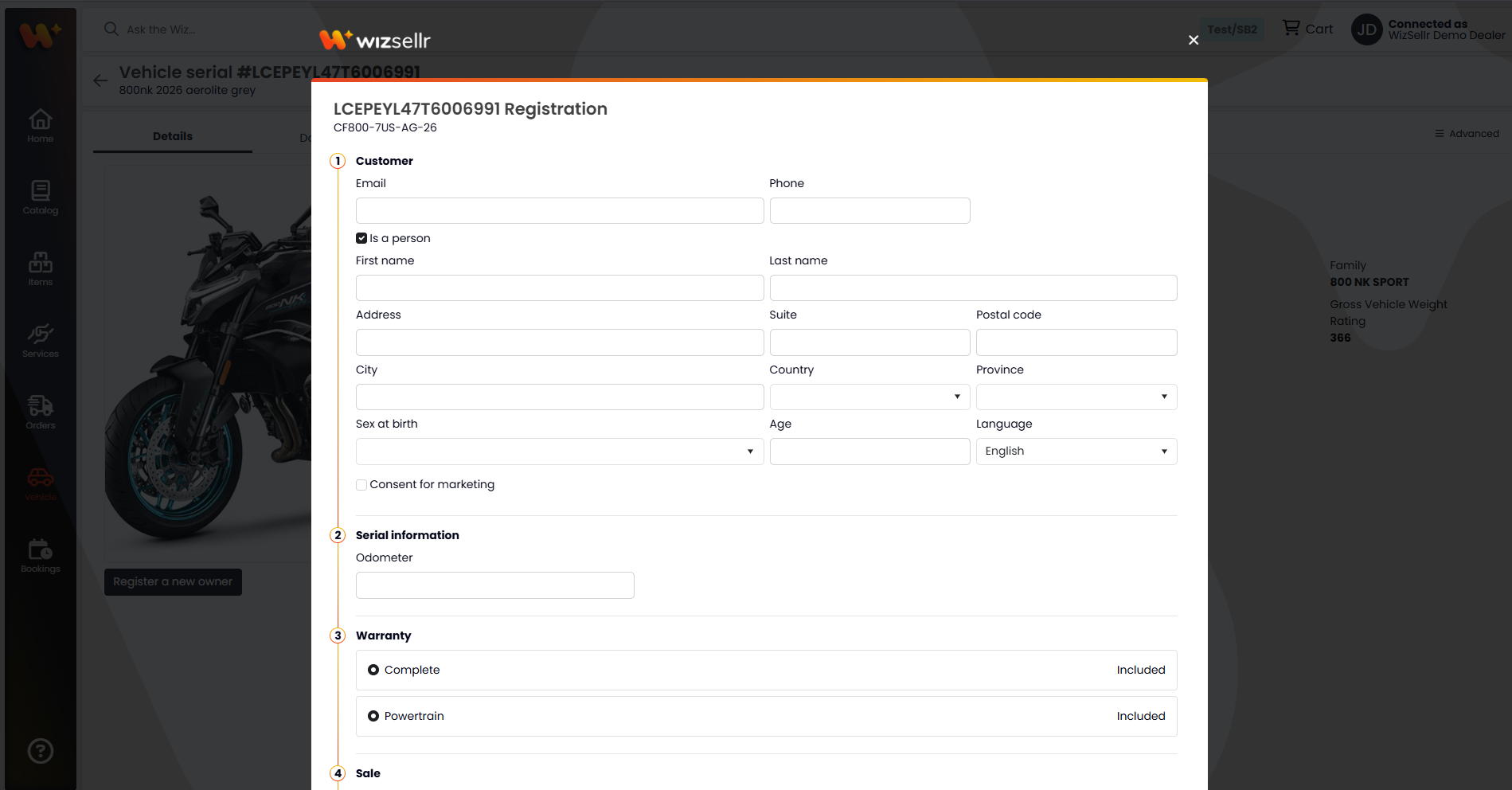
- On the vehicle's Details tab, click Register a new owner. The registration form opens, titled with the serial number.
- In step Customer, enter the owner's Email and Phone.
- Set whether the customer Is a person. For a person, fill First name and Last name; for a business, fill Company.
- Start typing in Address and pick a suggestion to fill in Suite, Postal code, City, Country, and Province (you can also fill them by hand). Then set Sex at birth, Age, Language, and, if applicable, Consent for marketing.
- In step Serial information, fill the serial fields, such as Odometer (KM). Fields you must fill are marked (required).
- In step Warranty, pick one option in each warranty group: a warranty to enroll, or None. When you select a warranty, its price becomes an editable field pre-filled with the MSRP; keep it or type the price you are selling the warranty for. Warranties marked Included, Active, or Enroll requested cannot be changed.
- In step Sale, choose the Salesperson and the sale Date.
- In step Legal notice, read the certification statement.
- Click Complete registration (or Back to vehicle to cancel).
- Back on the Details tab, click Download registration document to get the PDF once it has been generated.
Good to know
- Required fields: a valid Email, Phone, First name/Last name or Company, Address, Postal code, City, Country, Province, Sex at birth, Age, Salesperson, the sale Date, and every serial information field marked (required).
- The phone number must contain digits only (optionally starting with +), with no spaces or dashes, and have between 7 and 30 digits.
- Number fields in Serial information may limit the number of decimals (for example, whole numbers only). If a value is rejected, remove the extra decimals.
- The sale Date picker only lets you choose a date close to today (from yesterday to tomorrow).
- The form does not look up existing customers: typing an email no longer fills in the other fields, so enter the owner's full details every time.
- Warranties are optional. If you select a warranty and clear its price, enter a price before completing the registration; leaving the pre-filled MSRP enrolls the warranty at that price.
- Registration is processed in the background. The Details tab shows the status: Pending, In Progress, Blocked, Failed, or Success. Use Retry if it is pending or failed, and contact us if it stays blocked or in progress.
- Retry resends the registration right away and shows "Retrying registration..." while it runs. If it fails again, a "Retry failed" message gives the reason. If the serial can no longer be registered, you'll see "You can no longer register this serial number".
- The number of failed registrations appears as a red counter on the Registered tab of the Vehicles page.
- Download registration document appears only once the document has been generated (status Success), and only while the vehicle still belongs to the owner it was first registered to.