Follow Shipments
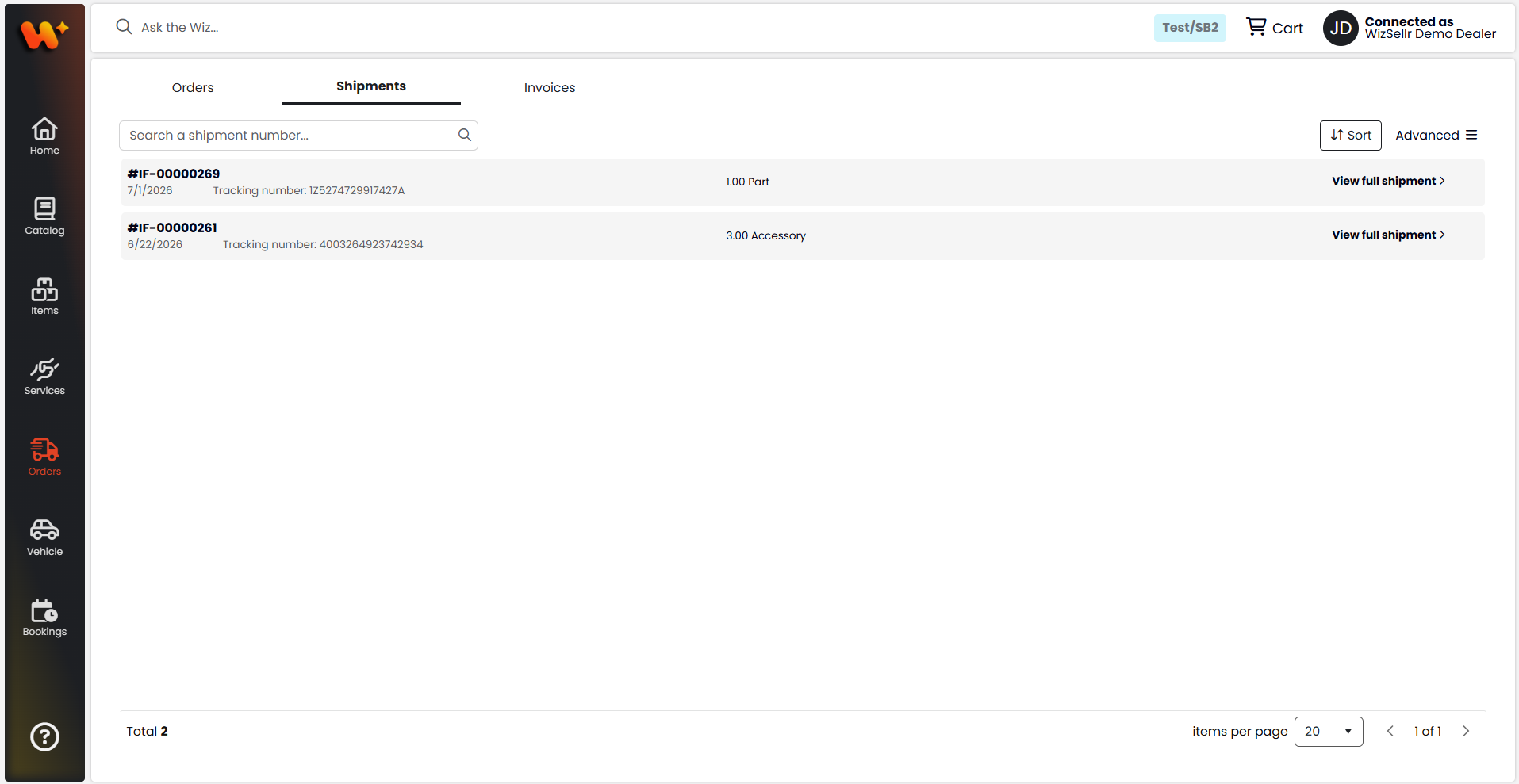
Track shipments tied to your orders and find carrier tracking numbers.
What you'll learn
- Finding a shipment by number, and filtering the list
- Reading shipment details and tracking numbers
- Downloading shipment documents
Before you start
- Open Orders from the main menu, then select the Shipments tab.
Steps
- In the search box, type a shipment number (Search a shipment number...) to find a shipment. The search also matches the tracking number.
- To narrow the list, click Filter:
- Select My orders to show only shipments for orders you placed.
- Under Order type, pick a type to show only those shipments, or All types to show everything.
- To reorder the list, use the sort menu (Newly added, Oldest added, Shipment number A-Z, Shipment Number Z-A).
- On each shipment card, read the shipment number, the shipped date, the Tracking number, and the item summary.
- Click View full shipment to open the shipment details.
- In the details, review Ship to, Created at, and the Tracking number, then open the Details, Orders, or Invoices tab.
- To save the shipment document, click Download file in the details, or click the download icon on the shipment card.
Good to know
- When no carrier tracking number is recorded, the Tracking number shows N/A.
- Use Export all in the Advanced menu to export every shipment; inside a shipment, the Advanced menu offers Export items and Download invoices.
- The download icon and Download file button appear only when a document is available.